
Check-in Time is at 3:00 p.m. However, early check-in or late checkout may be available when requested at least 24-hours in advance
Directions
In the U.S. Virgin Islands, we drive on the left side of the road. This is customary, dating back to when the islands were ruled by Denmark.
Directions on an island can be a bit challenging as there are often no street signs or the signs may be different than the actual street name. For instance, this home is located on Heron Road; yet, the address is 110 S. Grapetree. We’ve come up with a couple of ways for you to get to the house, minimizing any confusion.
1. The best option is: open your cellphone mapping app (Google Maps, Waze or Apple Maps). Then, click the search bar and type in “17.7498589, -64.5877812” (without the quotes). This will bring you directly to your vacation rental home.
OR
2. Open your cellphone mapping app and type in “Heron Rd, Christiansted” (without the quotes). This will take you to the correct street, but not to the home. Continue on Heron Rd and it will be the last house on the right. Actually, it’ll be the only house on the right.
You can also press the “Directions” button on the map widget below. However, do NOT use the below address (110 S. Grapetree or Grape Tree Rd) in Apple Maps as it will take you to a different location. If you are using Apple Maps or Waze, use Option-1 or Option-2 (listed above).
If you have problems locating the house, please contact us. Also, if you plan to arrive after dark, let us know in advance and we will program the exterior lights to stay on for you.
Google Maps
Only
How to Unlock the Doors
PLEASE WATCH OUR VIDEO (BELOW) – The majority of questions we receive are regarding how to unlock the front door. Please review the instructions and watch the video on this page to avoid any delays with entry.
Approximately two-days prior to your scheduled date of arrival, you’ll be sent a code to unlock the deadbolt on the front door (main floor). If you also rented the apartment on the lower floor, a separate code will be sent to you for the lockbox next to the apartment door . Within that lockbox is a key for the apartment. To be clear, you will only be given a lockbox code if you rented the apartment as well as the main house. For your privacy, the apartment will remain vacant if the home wasn’t rented as a three bedroom.
The front doors on the main house and the apartment, are both painted bright blue. All other doors are for storage, housekeeping supplies and utilities.
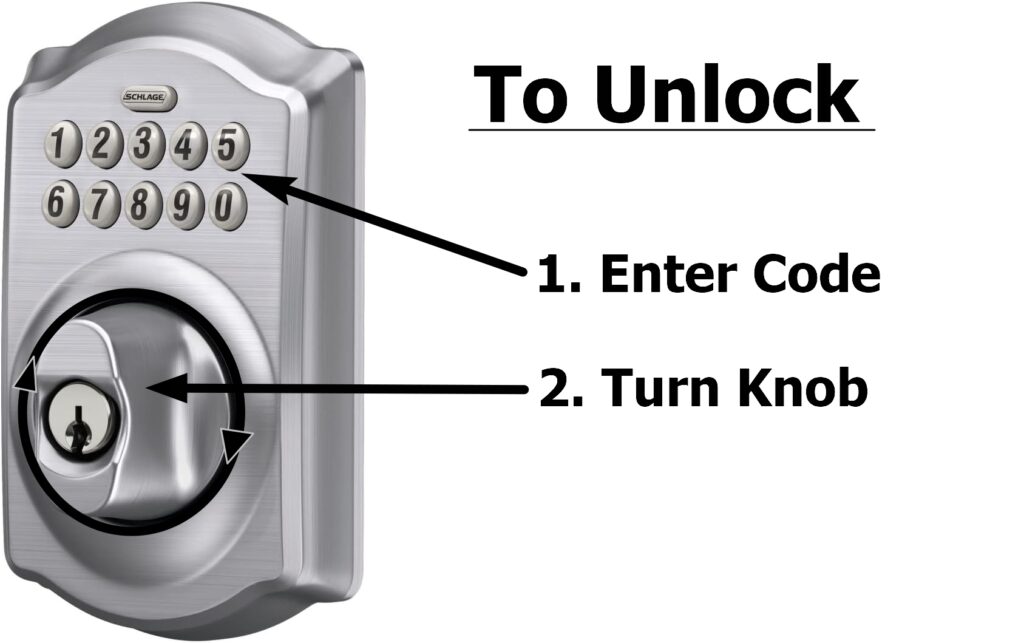
UNLOCKING THE PRIMARY DOOR: To unlock the main door (top floor), enter your code into the deadbolt keypad. If you entered the code correctly, the top “Schlage” button will flash green. You can then turn the deadbolt knob clockwise 1/2 turn to unlock the deadbolt. Then, depress the door handle thumb trigger and pull the door open. Note: if the deadbolt knob turns freely, without locking or unlocking, it’s because the code was incorrectly entered. Re-enter your code, wait for the button to flash green and the turn the deadbolt knob clockwise.
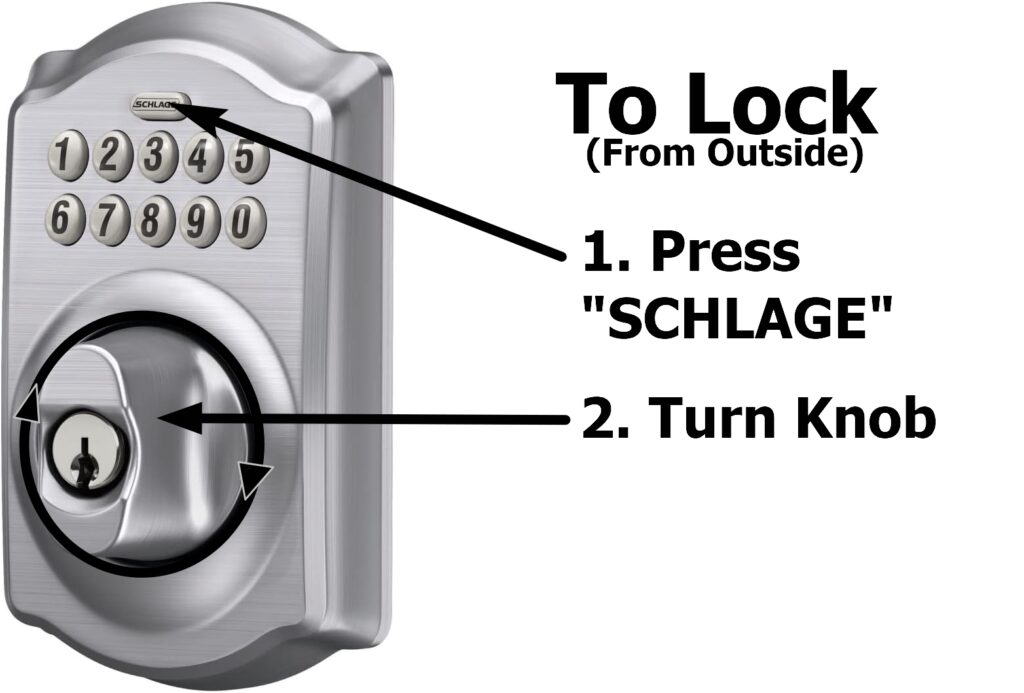
LOCKING FROM THE OUTSIDE: You do not need to enter a code to lock the deadbolt from the outside. Simply press the “SCHLAGE” button on the top of the keypad and then turn the deadbolt knob counter-clockwise. You should feel the knob stop at 180 degrees. To ensure the door is properly locked, depress the door handle and gently pull back.
PLEASE WATCH OUR VIDEO
Locking and Unlocking the Lower-Level Apartment
If you also rented the lower level apartment, it uses a standard deadbolt key, which is kept in a lockbox next to the apartment door. You will receive a separate code for the apartment lockbox. Enter the code and open the lockbox. Use the key to unlock and lock the apartment door during your stay. Please remember to return the key to the lockbox when you check out. If you lose the key or fail to return it at checkout, a $40 fee will be charged.
Wi-Fi
The home Wi-Fi code will be sent to you a couple of days prior to your scheduled arrival date.
Cellular Service
There are two cellular phone carriers that have a good presence in the Virgin Islands; AT&T and T-Mobile. This may include other cellular companies that operate on cell towers owned by AT&T and T-Mobile, such as Liberty, Cricket, H20, Consumer, Straight-Talk, Mint, Etc.). It’s been our experience that if you use a US based carrier, you will NOT need to pay additional roaming fees during your visit. However, you should confirm this with your cellphone carrier.
AT&T offers the best coverage on the island, including the area in and around this vacation rental home. T-Mobile has fewer cell towers, so you may not have a good signal inside of the house. However, I once made a hat out of aluminum foil and was able to get a faint signal. My wife was not amused.
Verizon Wireless has only limited presence on the island but occasionally we receive positive comments about Verizon working quite well. Many android phones and some other carriers have an option for “Wi-Fi Calling.” If you turn this option on, under the settings section of your phone, you may be able to make and receive calls from the property using Wi-Fi only.
Need Assistance?
If you get lost, have problems with check-in or just have a question, please contact us via the AIRBNB app. If you need immediate help, please press the button on the Ring Video doorbell next the main door on the upper floor.